


8HP Basics: Chapter 3 - Tuning
A great 8HP shift usually takes two or three modules working together. The TCU decides when to request a cut or blip and how the clutches behave. The ECU decides what the engine actually does with those requests. Get one right and the other wrong, and the car can still shift badly.
We've worked on a lot of 8HP swaps with CANTCU, MaxxECU and Turbolamik. This is how I approach the tuning once everything is installed: get the torque calculation close, verify the requests, tune the ECU's response, and use the logs instead of guessing. I've also included example tables for the different cut and blip strategies, because that's what everyone really wants to see.
About the maps: These are examples from our cars, and are just a general rule of thumb, to show the table shape, axis and scaling—not neccesarily universal starting tunes.
Torque is the Language
Engine torque is one of the most important inputs to an 8HP. It's either supplied by the ECU or estimated by the TCU based on RPM, TPS, MAP, VE and other engine data. That value helps determine clutch pressure and shift behavior. Too much reported torque: shifts and takeoff can get unnecessarily harsh. Too little reported torque: clutch pressure may be insufficient, causing flare or slip.
Don't tune an ECU to fix a bad torque model. Make sure the torque calculation is reasonably close first, then tune the shift. If you have any issues, you can look back at the torque table later, to make smaller changes.
Legit Tip: A percentage request isn't always literal. A 100% TCU cut request does not automatically mean 100% of the ignition events should be cut. Your ECU table decides how to interpret the request.
What You Can Adjust- In the TCU
CAN-based TCU systems give you flexibility in shaping how the factory TCU behaves. A standalone lets you rewrite its behavior entirely.
CANTCU
Torque Calculation: On ECUs that don't natively send a torque estimate, CANTCU does the torque calculation internally. Uses a Torque Factor value set in the software to make torque number "relative". That number isn't a torque value in itself; CANTCU calculates the torque, and uses that value as part of the equation.
Cut/Blip Signals: Cut/Blip %, Target RPM, Target Torque
Modes: A large range of BMW OEM driving modes, from Eco to Sport+.
Shift Maps: Editable in the Race+ software. Otherwise, uses modifiers on OEM based maps.
Converter and Launch: Minimum lockup RPM, neutral-idle decoupling at a stop, and a transbrake with bump with the new RACE+ Flash.
Virtual Clutch: Bite Points based on voltage input.
Blip Delay: How long after the shift starts the blip request fires out.
On a gateway setup, the factory level shift logic stays in charge. That's the appeal: you get OEM smoothness and protection, and you steer it with torque, cut and blip. The quicker the engine hits its target, the quicker the shift finishes.
To change CANTCU's shift behavior quickly while using standard OEM+ flash, use the pedal-correction and brake-correction sliders on the tuning page. Takeoff torque is adjustable too, which helps how the car pulls away from a stop.
MaxxECU
Torque Table: The 8HP torque table sets the torque sent to the TCU, which drives its behavior.
Shift Maps: The auto shift target table sets shift RPM against throttle position, anywhere from 1,500 to 9,000 RPM.
Cut/Blip Signals: Cut/Blip %, Target RPM
Modes: Street, Sport, Track and Drag, based on the OEM Demon modes.
Clutch control: Helps the car not push through the converter.
Converter Slip: A digital input can request extra converter slip, up to about 800 RPM at the driveshaft.
Trans-Brake: Triggerable several ways
Virtual Clutch: Bite Points based on voltage input.
Blip Delay: Used to sync blips. Usually keep at 0 if using native MaxxECU 8HP control, and adjust more often if using Maxx as a TCU speaking with another ECU.
Some of these need newer MaxxECU TCU firmwares, so check your firmware version against MaxxECU's 8HP settings page. When MaxxECU runs the engine too, shift cut and throttle blip live in the same software, which is super streamlined. When it's a standalone TCU behind another ECU, everything above still applies, but the torque model associated signals and the cut/blip requests have to be built through custom CAN.
Turbolamik
Pressure and Torque Calibration: The pressure-versus-torque tables and multipliers.
Shifts: Upshift and downshift aggressiveness for each of the eight programs, from soft street to hard race shifts.
Cut and Blip Outputs: Target Torque or Cut/Blip %.
Shift Tables: Up and down points against RPM, TPS and speed, per gear and per mode. There's no skip-shift capability. I don't really see that as an issue, but some people want it, so it's worth noting.
Converter and Clutch Lockup: Converter lockup, transbrake bump pressure, the virtual clutch, and clutch-slip control for cars with a high idle. There are plenty of maps to adjust each of these, and Turbolamik gives you the most flexibility for custom strategies.
Everything Else: There are many undocumented pages in the Turbolamik software to experiment with. It takes some trial and error to get savvy with it.
Legit Tip: Calibrate the TPS window carefully. Leave a little room below 0% and aim for about 96% at wide open throttle. A window that overshoots or doesn't return to zero throws codes.
Tuning Order of Operations
An efficient workflow for a TCU integration:
Check Signals: Confirm the TCU sees RPM, throttle, MAP and so on, and calculates a sensible torque. Make sure the ECU sees gear, cut and blip requests. Finalize ratio and wheel speed calibration on the road or a dyno; blip RPM targets depend on it, and the transmission often behaves strangely when wheel speeds don't agree. Making sure every signal works and is scaled correctly is step one. For wiring and termination, see the CAN bus layout section in Choosing an 8HP TCU.
Adaptation: After the install, do relaxed street driving through every gear so the box can learn. Next, start adding load, confirm the clutches aren't slipping at full power, and only then dial in the cuts. Re-adapt after fluid changes or big torque model changes.
Big Cuts and Small Blips: The safest way to tune.
Log: Change one thing at a time, and measure the results with both your butt dyno and the data.
Add Fun: Sport modes, launch, transbrake and virtual clutch.
Tuning Strategies
Each TCU can output a few different types of shift-request channels, most commonly Cut/Blip %, Target RPM, and Target Torque. Most will pick on strategy style, and apply that to one axis of all of their cut and blip maps.
The simplest way to tune is with a straight Cut % or Blip % table. In that setup, the TCU sends a percentage-based request, and the ECU responds with whatever amount of ignition cut, fuel cut, retard, or throttle blip you’ve mapped to that percentage. It’s simple, effective, and usually easy to get close. Final result is not the best.
If you want more control, Target RPM and Target Torque strategies can work very well too. Most of the time, these are used with a math channel in the ECU. For example, you take the target value from the TCU and compare it to the current value from the engine, such as current RPM or current torque. That gives you a "delta", or "difference" channel, which is just how far off you are from the target. You then use that delta to decide how much cut or blip the engine needs. It creates a tune that responds to a moving target very well.
Legit Tip: Pay attention to the order of subtraction in your math channels. For upshift cuts, use Current − Target, since RPM or torque needs to decrease. For downshift blips, use Target − Current, since RPM or torque needs to increase. This keeps your delta values positive as more intervention is needed, making the tables easier to build and tune. You can reverse the math if needed, just make sure your table axes match!
That approach can give you a more refined result, because the ECU is reacting to how far away the engine is from the goal, instead of just following a fixed percentage request.
If you’re keeping things simple, though, a basic Cut % and Blip % setup can still work extremely well and is often the easiest place to start to get your feet wet.
Below are three basic examples showing the axis layout for each strategy.

Legit Tip: When setting "zero" column for target rpm, just rev the car in neutral, and set values to whatever throttle is needed to hold that given rpm.
Tuning - The ECU Side
Now, for what you've all been waiting for, mapping out shift strategies. For cuts, my default is ignition cut on boosted engines and fuel cut on naturally aspirated ones, blended with retard or throttle where it helps. Downshifts get a throttle blip, tuned using one of a few strategies that mostly depend on what your ECU uses.
Upshift: Cutting Torque
Ignition Retard: A soft reduction in power. It's good alongside an ignition or fuel cut to smooth out the shift intervention. On its own it can't remove much modeled torque, because most torque calculations are heavily based on MAP or VE, and retard only changes MAP minimally.
Ignition Cut: Acts instantly, and it's good for big, fast reductions at full load. It's loud, adds exhaust heat, and can increase turbine speed (Sweet!).
Fuel Cut: Its effect varies widely depending on how aggressively it's used. It's most common on naturally aspirated cars, and it's a very OEM style, emissions-driven approach to torque reduction.
Throttle Closing (e-throttle): The most sensitive, and the slowest to react shift cut type. It can work on its own as a cut strategy, but its not recommended when you have other options.
Why ignition cut on boosted cars: A turbo engine at full boost has a lot of torque to drop in a small window, and ignition cut is fast. Fuel keeps flowing, spinning the turbine after lighting up in the exhaust, and cylinders don't go lean and possibly knock. We also retard our max-load upshifts a little, to reduce any chance of knock during any cut.
Why fuel cut on N/A cars: There's less torque to remove, and fuel cut avoids the pops and bangs. It's the gentler choice for street cars.
Legit Tip: On street cars going for smooth shifts, ramp in retard first, then cut.
Mixing them: A good ECU lets you blend these without having to think too hard about it.
You can base your cut logic on a few parameters: a cut %, a target RPM, or a target torque. The 8HP natively asks for torque targets on both cuts and blips, and the TCU translates these into a target RPM or a relative %. Torque-based requests are the most accurate.
Downshifts: The Blip
Blip logic can use the same parameters: a blip %, a target RPM, or a target torque. Here too, torque-based requests are the most accurate.
A blip tune comes down to three things:
How much: too little, and the clutches have to drag the engine up, which feels like a lurch. Too much, and RPM overshoots, then the car pushes forward.
How long: don't use time-based blip control in the ECU. Let the TCU's outputs dictate the blip's length and amount.
When: the blip delay, from the shift request to the torque increase. Too early, and the car pushes forward before the transmission releases the clutches. Too late, and the shift starts without it, making it lazy.
Overun Fuel Cut: Check your overrun fuel cut settings. I recommend not using it, but if you do, make sure it disengages during a blip request on decel, where it would otherwise be active. Doing this also shortens the blip delay. Start small and add blip gradually while watching the log.
Legit Tip: When targeting blip RPM, aim for about 150 RPM above what the TCU requests in most cases.
Expect the TCU to ask for less blip on a lazy coasting downshift and more under hard braking. That's normal, and you can change it in the Turbolamik maps. Otherwise, it's easy to follow the requests from CANTCU and MaxxECU, which let you know what they're thinking, so to speak. I usually disable the blip below about 2000 RPM. The 8HP asks for very little down there, and it makes relaxed driving smooth, and elimates the car driving forward with a blip in a parking lot. .
Legit Tip: A common sign of overshoot is a cut request from the TCU right after the initial blip.
Tuning Table Examples
These are example maps I use most often for cuts and blips. Every ECU names and lays them out a little differently, but the idea is the same: the TCU's request goes in on one axis, and the table decides how hard the engine responds. Use these as a starting shape, not as numbers to copy.
Cut %: Ignition cut - Most Simple
What: Turns the TCU's cut request into an ignition cut %
Axis: Cut request %, often with engine RPM added to other axis.
What to notice: the low end is aggressive, and the table isn't linear. 100% requested cut from TCU is not meant to command 100% spark cut in ECU.

Cut %: Ignition Retard - Most Simple
What: Turns the TCU's cut request into an ignition retard angle.
Axis: Cut request %, often with engine RPM added to other axis.

Cut %: Fuel Cut
What: Turns the TCU's cut request into a Fuel Cut
Axis: Cut request %, often with engine RPM or MAP (load) added to other axis.

Blip %
What: Turns the TCU's cut request into an ignition retard angle.
Axis: Cut request %, often with engine RPM added to other axis.
When: Enable secondary throttle map when blip % is greater then 0.

Target Torque: Blip
What: Turns the TCU's blip request into a throttle blip by enabling a secondary throttle map.
Axis: Target Torque Delta and RPM.
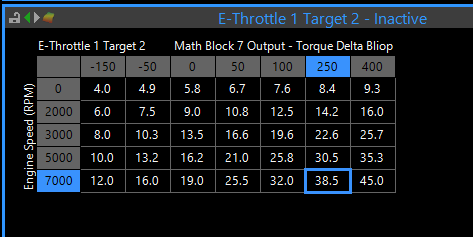
Target RPM: Blip
What: Turns the TCU's blip request into a throttle blip by enabling a secondary throttle map.
Axis: Target RPM Delta and RPM.

Common Problems and Fixes
Selector won't change gears: Usually no brake signal. Wire one in; every controller needs it.
Solenoid resistance code (for example, Turbolamik code 182): A sticky solenoid, or one just outside the controller's resistance window. Measure the solenoid; a Sonnax Zip Kit can free a sticky one. Check the pins for shorts using the Turbolamik mechatronic errors guide.
Impossible readings (for example, a 1,450° trans temperature): Check the wiring.
The TCU sees ECU data, but the ECU doesn't see trans data: The ECU-side CAN setup needs work. If either end receives, the bus works, so fix the receive setup in the ECU.
No CAN communication at all: Check CAN bus termination. The resistance between CAN high and CAN low should be 60 ohms, the result of a 120-ohm resistor at each end of the bus.
The car shifts up through every gear while stopped in Drive: Check TPS, pedal and speed scaling.
The car pushes through the brakes at a stop: That's the converter combined with a high idle. Lower the idle if you can. A clutch-slip strategy at idle, set up in the tuning software, can also fully unload the box at a stop.
Real-World fixes
Most 8HP shift problems I see come down to three things: not enough cut, a blip at the wrong time, or bad speed and ratio data. These three recent cars each show one of them.
Endurance race car: lazy upshifts, unstable downshifts
MaxxECU, BMW six-cylinder.
Symptom: Upshifts felt like an old automatic slipping slightly, with no crisp RPM drop. On downshifts, the lower gear's clutch began to grab before the blip arrived, so the car slowed and then lurched forward mid trail-brake. The drivers were skipping double downshifts to avoid it.
Cause: Too little cut on upshifts, and a large delay built into the blip.
Fix: more cut, and the blip delay removed. After one test session, the driver said the shifting was completely transformed.
Bonus: Occasional ignored paddle pulls came from the shift signal being read too slowly. We raised the CAN refresh rate and added a short hold so quick paddle clicks always register.
LS-swapped track car: no blip on coasting downshifts
Link ECU with CANTCU.
Symptom: Upshifts were crisp, but downshifts felt like they needed more blip.
Cause: The logs showed the TCU wasn't requesting a blip on most downshifts. The wheel speeds had been recalibrated without resetting diff-ratio learning, and the learned ratio had settled at 4.27:1 on a 3.46:1 axle.
Fix: Reset diff-ratio learning. After about ten minutes of driving, it learned 3.46:1, and blips appeared on coasting and braking downshifts with no extra throttle added.
Also found: The pedal only reached 60% because of a calibration issue. Check the whole system, not just the transmission.
Carbureted big-block drag-and-drive car: push at idle
Carbureted 540 cubic-inch engine, 8HP90, Turbolamik analog harness.
Symptom: The car pushed through the brakes in gear, and it threw a TPS code after each pass.
Fix: For the push, Turbolamik's clutch-slip strategy, which unloads the transmission at idle until you touch the throttle. For the code, we re-windowed the TPS so it never overshoots at wide open throttle.
Result: 6.5-second passes in the eighth mile on its first test outing.
FAQ: tuning
My stock ECU has no torque management at all. Will the trans live?
It can last a long time if you set the controller to slow the shifts down and limit harshness. Turbolamik copes best here.
Do I need upgraded clutches?
Not to start. Keep the stock clutches until they actually slip. Good shift tuning and an accurate torque figure often get you there without spending money on upgrades.
My ECU can't blip. Can I add a standalone blip box?
I don't recommend it. A shift needs a real rev match, not a generic blip. Put that money toward a modern ECU with electronic throttle.

Comments